
WhatsApp lets you chat without sharing phone numbers – here's how to claim your username
A New Era for WhatsApp: Chatting via Username
WhatsApp is set to revolutionize the way users communicate by introducing a feature that allows people to chat using a username instead of a phone number. This move, which will be rolled out globally over the next few months, aims to enhance user privacy by eliminating the need to share personal phone numbers when sending messages.
The app has already started testing username reservations with some users in the UK. However, it seems the rollout is happening in phases rather than being available country-wide immediately. With three billion account holders worldwide, users are encouraged to act quickly to secure their preferred username.
“We have designed this as a core privacy feature,” said Alice Newton-Rex, WhatsApp's vice president of product. “People will need to know your exact username to contact you for the first time.”
Catchy and unique usernames are highly sought after, and users are expected to rush to claim desirable ones. “I think a lot of people will go and get usernames and that’s why we decided to open reservations early,” Ms. Newton-Rex added.
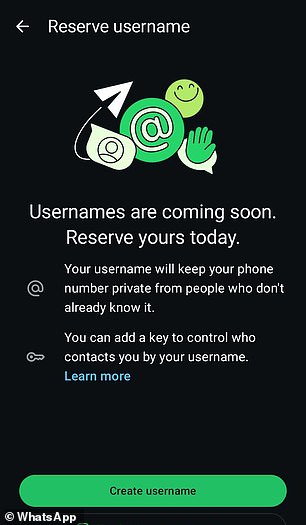
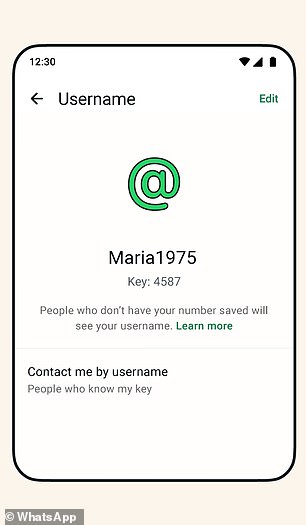
Companies, organizations, and creators who already have accounts on Meta's platforms, such as Instagram and Facebook, will have the opportunity to claim their usernames on WhatsApp. Usernames must be between three and 35 characters long. To prevent impersonation, WhatsApp will hold back certain usernames for high-profile individuals or groups, including celebrities, public figures, and government entities.
The reservation feature is being introduced gradually, country by country and account by account. Even if you've updated the app, you may not have access to the feature yet. WhatsApp will notify users through an in-app notification when username reservations become available for them.
In a blog post titled “It’s time to reserve your WhatsApp username,” the company explained, “When someone new walks into your life — a classmate, a neighbour, someone you meet at an event — sharing a phone number can feel like a big step. That’s because a phone number is personal and it’s tied to so many parts of your life. Sometimes you just want to chat without handing over your digits. That’s why we’re introducing usernames for WhatsApp.”
How to Reserve Your Username
To reserve your username, follow these steps:
- Download the latest version of WhatsApp
- Go to Settings, then Account, then Username
- Come up with a username between three and 35 characters long
- You will receive a notification once the feature goes live later this year
(If you do not see an option for reserving a username, then it hasn’t been rolled out to your phone just yet – keep checking over the coming days)
WhatsApp suggests creating a username that is unique and something only the people you want to contact you will know. The company has also developed a username generator to help users come up with one.
“There’s no directory to browse and no suggestions – people will need to know your exact username to contact you for the first time,” the blog reads. “To help control who can reach you on WhatsApp with your username, we’ve built an optional username key that others will need to know to message you.”
A username key is an optional setting that gives users more control over who can contact them by their username. If you enable a key, people who want to reach you by your username will need to enter your username key before they can send you a message for the first time. This can help protect against unwanted messages. People who already have your phone number or are in a group with you won’t need your key to message you.
Users will receive a notification once the feature goes live later this year. You can change your reserved username or delete it at any time. If you change or delete your reserved username, it may become available for others to claim.
However, the feature is completely optional, and users can still choose to share their phone number if they prefer.
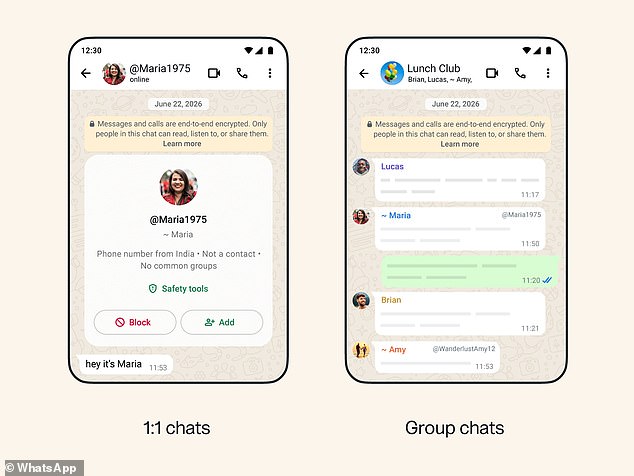
Currently, WhatsApp’s privacy settings are limited to blocking individual users and silencing unknown callers. The app also allows users to add a profile name, but that is only displayed in chat groups for other people who don’t have the user’s contact info saved.
Post a Comment for "WhatsApp lets you chat without sharing phone numbers – here's how to claim your username"